🚀 What's New – Sales, Item Master & Invoice Enhancements 🚀
We've introduced several enhancements across Item Master, Sales Order, Sales Invoice, and Sales Return modules to improve value-based item handling, invoice accuracy, validation, and overall transaction efficiency.
1. Item Master – Item Based On Option
-
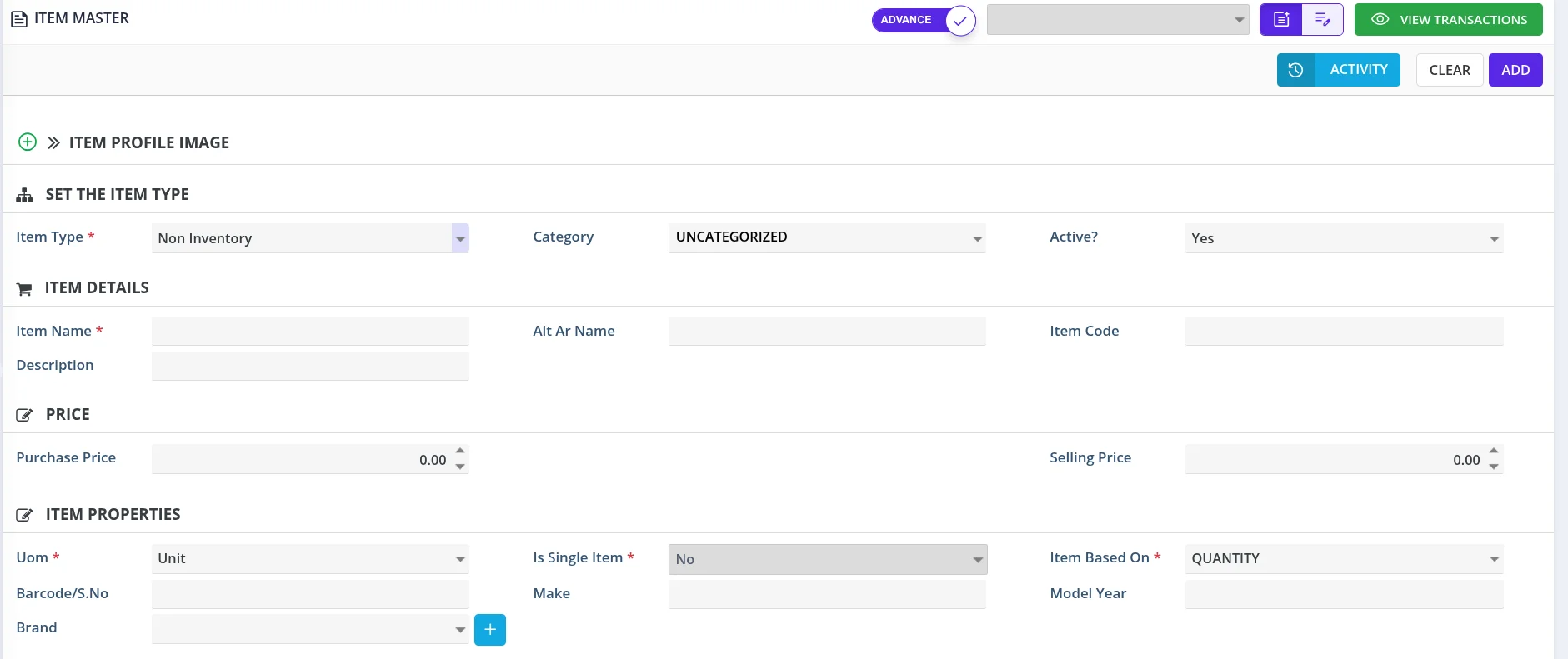
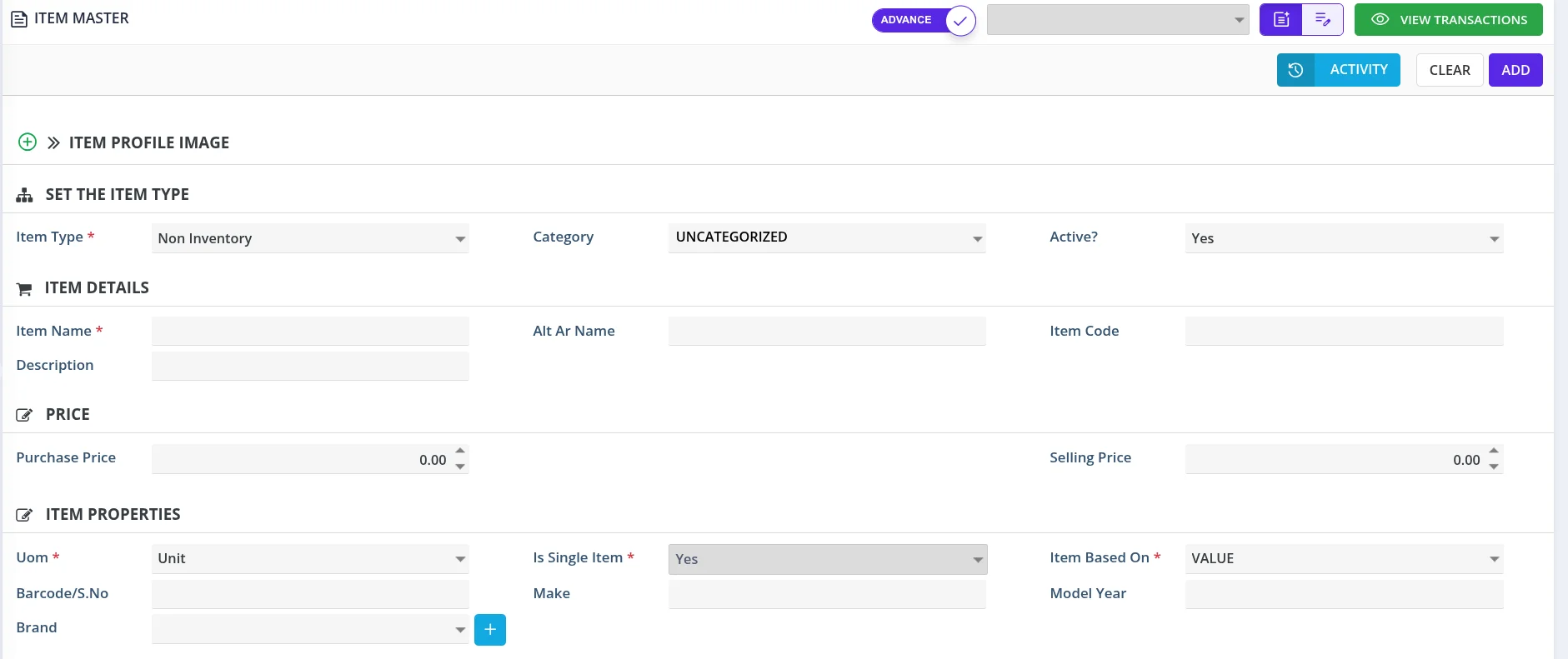
The Item Based On field is now displayed only for Non-Inventory items.
-
Users can choose between VALUE and QUANTITY to define how a Non-Inventory item is handled.
-
Selecting VALUE automatically enables Single Item.
-
Selecting QUANTITY automatically disables Single Item.
-
The Single Item field becomes locked once an Item Based On option is selected.
-
Existing single-item records are displayed as VALUE when opened, without changing their previously saved configuration.
2. Sales Order – Improved Value-Based Invoicing
-
Value-based Non-Inventory items are now correctly identified based on their Item Based On and Single Item settings.
-
Supports multiple partial invoices against a single Sales Order line for value-based items.
-
Invoice tracking is based on the invoiced monetary amount rather than quantity.
-
Partial and fully invoiced statuses are calculated based on the invoiced amount against the Sales Order line total.
-
Quantity validation is enhanced to avoid incorrectly restricting value-based items.
-
Validation errors now display the relevant item names and report all identified violations together.
3. Sales Invoice – Enhanced Item Handling
-
Improved identification and handling of value-based Non-Inventory items during invoice creation.
-
Quantity-based Non-Inventory items are correctly treated as non-single items.
-
Improved remaining percentage calculation for quantity-based Non-Inventory items using actual invoiced quantities, including compatibility with older transaction records.
-
Value-based items can now be invoiced with quantities greater than one.
-
Existing single-item quantity restrictions remain applicable to other single-item types.
-
Improved inventory serial-tracking handling to support value-based items with quantities greater than one.
4. Sales Invoice – Duplicate Row Feature
-
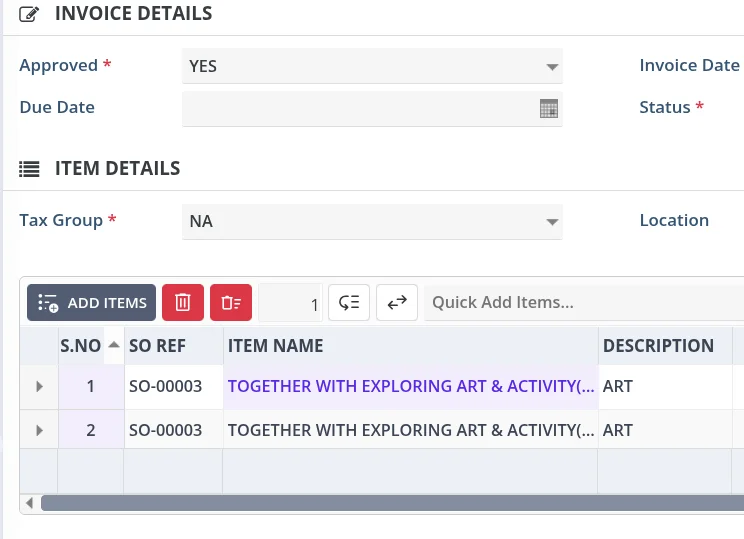
Added the ability to duplicate existing item rows in the Sales Invoice.
-
Users can quickly create a copy of an existing invoice line without manually entering the item details again.
-
Reduces repetitive data entry and speeds up invoice preparation.
-
Improves efficiency when creating invoices with similar or repeated item details.
5. Sales Order – Invoice Value Limit Validation
-
Added enhanced validation to prevent invoicing beyond the ordered Sales Order value.
-
Considers invoice amounts across multiple invoices and duplicated invoice lines.
-
Approved sales returns are deducted when calculating the invoiced value.
-
Prevents saving when the invoiced value exceeds the ordered line value by more than 0.05.
-
The validation applies to both Inventory and Non-Inventory items.
-
Sales Order total-level validation is also included.
6. Sales Return – Improved Line-Level Handling
-
Enhanced Sales Return validation with line-level handling aligned with Sales Invoice processing.
-
Improves consistency in handling item-level return transactions.
Key Benefits
-
Better support for value-based Non-Inventory items.
-
Flexible partial invoicing with accurate value tracking.
-
Faster invoice preparation through the Duplicate Row feature.
-
Improved Sales Order and Invoice validation.
-
Prevention of over-invoicing beyond the ordered value.
-
Better compatibility with existing transaction records.
-
More consistent handling across Sales Orders, Sales Invoices, and Sales Returns.
These enhancements improve billing accuracy, reduce manual effort, and strengthen transaction consistency across the sales workflow.