What's New: Purchase Order Enhancements
1. Configurable Payment Terms Table
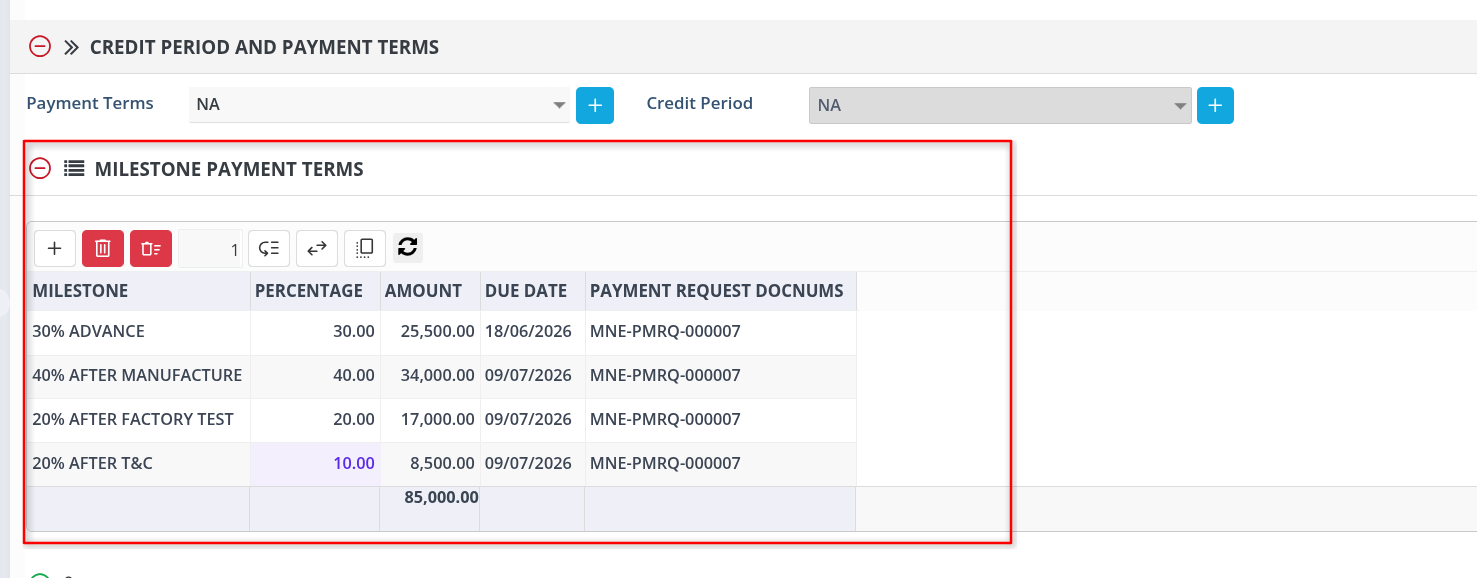
Payment terms are no longer tracked outside the system. The PO form now has a Payment Terms table, with amounts calculated automatically from the PO total.
How It Works
| Field | Behavior |
|---|---|
| Payment Term | Free text (e.g. "30% advance") |
| Percentage % | Entered manually |
| Amount | Auto-calculated as PO Total × %, editable if needed |
| Due Date | Entered per line, for when that installment is payable |
Line totals are checked against PO Total.
Example
PO total: 100,000. Lines: 30% advance (30,000), on delivery 50% (50,000), on acceptance 20% (20,000) — sums to 100,000, so no warning.
2. Auto-Calculated Due Date on Purchase Invoice
PINV Due Date is now calculated automatically from the PO's Credit Period, instead of being entered manually.
How It Works
Due Date = PINV Transaction Date + Credit Period
If a PINV pulls in multiple POs, the credit period of the last selected PO applies.
Example
PO credit period: 30 days. PINV raised Dec 1 → Due Date auto-fills to Dec 31.
3. Letter of Credit (LC) Tracking on POs
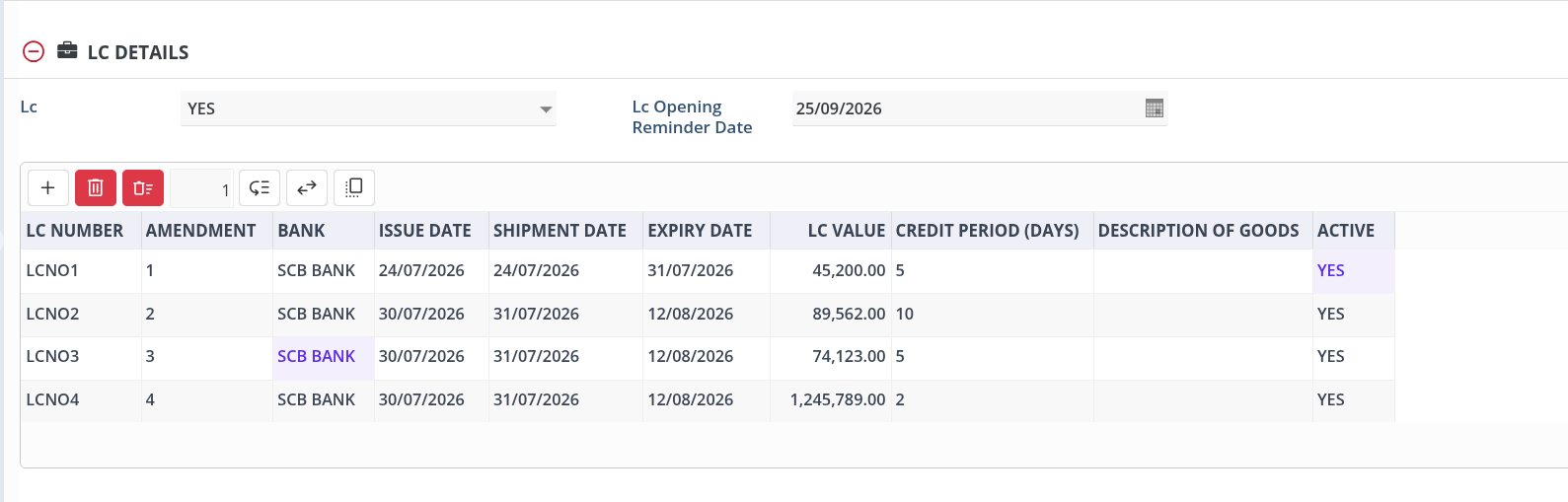
POs can now be flagged for LC, with a full LC record — instead of tracking this manually.
How It Works
| Field | Behavior |
|---|---|
| LC | Yes/No |
| LC Opening Reminder Date | Required when LC = Yes |
| LC Grid | LC No, Amendment, Bank, Issue/Expiry Date, Amount, Currency, Active, Remarks |
LC records can be added or edited at any time — even after Item Receipt, Purchase Invoice, or partial processing — until the PO is Closed, at which point the section becomes read-only. Expired rows auto-lock as well. The LC Opening Reminder Date can also be used to schedule email reminders to users.
4. PO Tolerance for Quantity Variance
POs can now be flagged for PO Tolerance, allowing small quantity overages at Item Receipt and PINV instead of blocking them.
How It Works
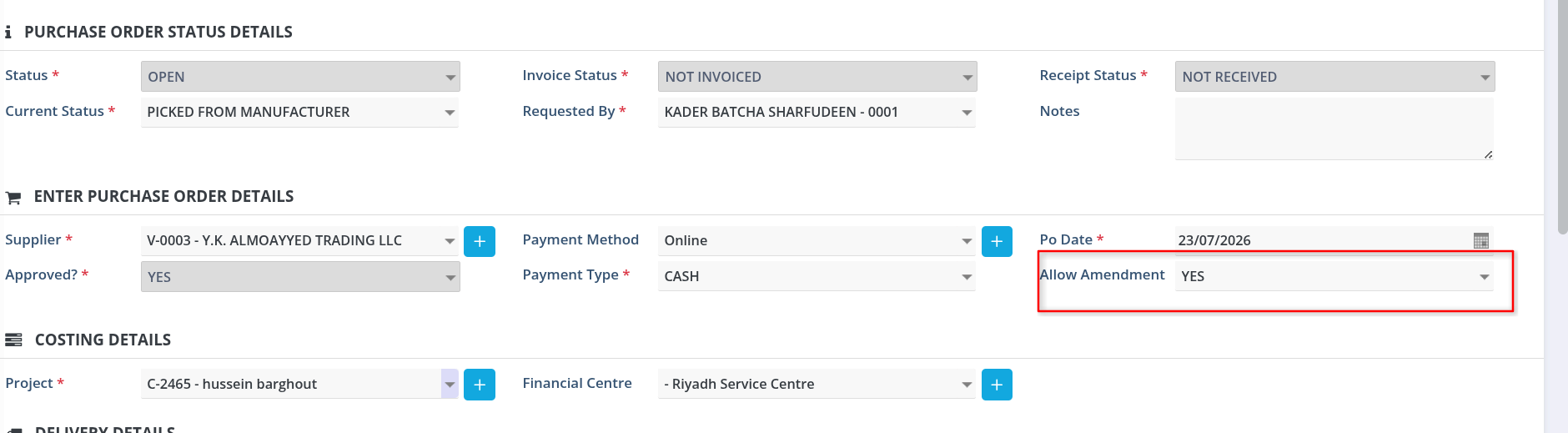
Approved POs can't be updated directly. If the received/invoiced quantity increases beyond the PO quantity, an authorized user sets Allow Amendment = Yes on the PO — this itself is role-restricted. Once enabled:
- Only the item Qty field can be edited, even with active IR/PINV
- Qty can't be reduced below the already received or invoiced quantity
- No new line items, and received/invoiced items still can't be deleted
- Header values can't be changed
Example
PO: 10 TON of coil. Delivered: 10.14 TON. An authorized user sets Allow Amendment = Yes, updates the item Qty to 10.14 TON , then completes Item Receipt against the updated PO.
Who's Affected
- Procurement/Accounts — configure payment terms, credit periods, LC details, and tolerance flags; no more side spreadsheets
- Warehouse/Receiving — process real delivered quantities without PO mismatches blocking receipt
- Approving managers — see validated payment schedules, accurate due dates, and LC status at approval time
- Finance/Audit — get a locked, traceable record once a PO closes
Benefit
- Payment terms, due dates, and LC tracking all live on the PO — nothing tracked separately
- Full traceability between PO, Item Receipt, and Invoice
- Fewer blocked transactions from fractional quantity overages
- Per-PO flexibility instead of one rigid rule for every PO
To avail this feature, please contact support.