🚀 Whats New: ISM OTP Confirmation🚀
We’re excited to introduce a new feature that enhance inventory stock movement transactions. Business users can now securely manage inventory stock movements.
What is the ISM OTP CONFIRMATION Feature?
The main purpose of this feature is to ensure that only the respective person, specifically the "To Location" Manager, can receive and confirm the stock movement. This enhances the safety and security of the process by verifying that the correct individual is authorizing the transaction, thereby preventing unauthorized access or errors during the stock receiving process.
How to Use ISM OTP CONFIRMATION Feature
Create a Transaction: Create the Inventory Stock Movement Transacation from the sender side.
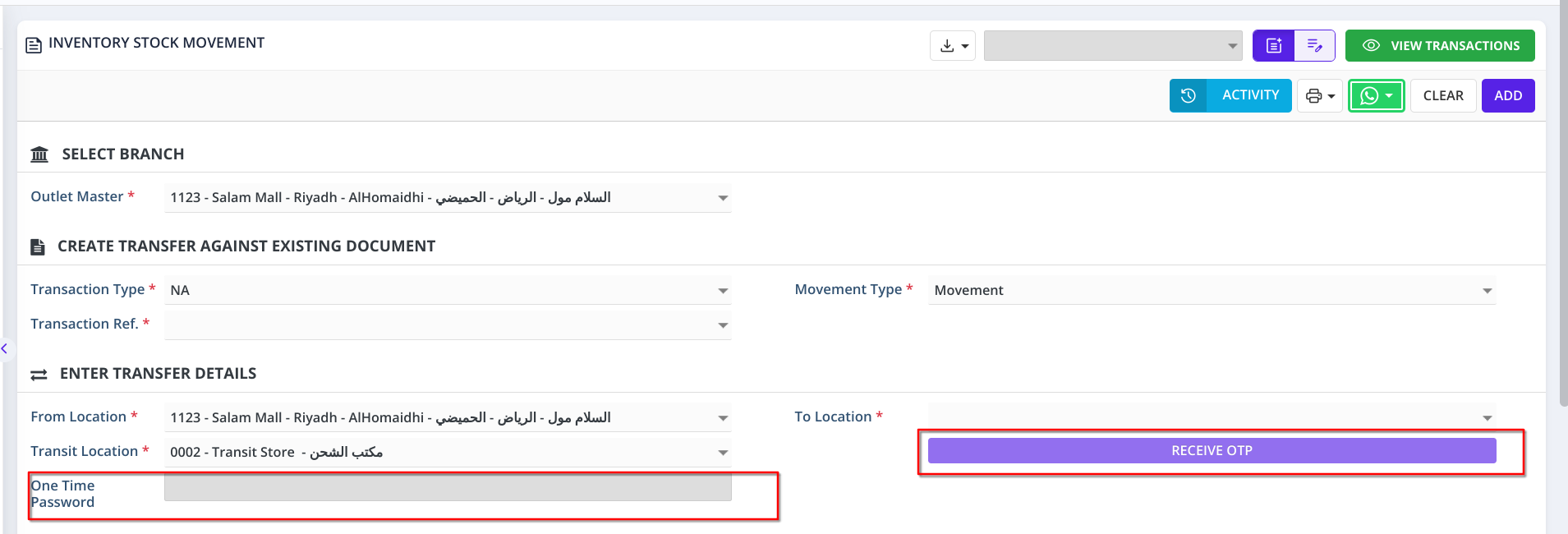
Open the Transaction in Edit Mode: On the Receiving side, open the transaction and click the Receive OTP button.
To Location Manager: For each location, the manager and manager's mobile number should be set in the Inventory Store screen. When the Receive OTP button is clicked, the respective To Location Manager for the Transaction will receive the OTP.
Enter OTP: Enter the valid OTP received on the To location manager's mobile number
Save the Transaction: Once the valid OTP is entered, you will be able to save the transaction on the receiving side.