What's New: Configurable Leave Balance Calculation Type
Today, when an employee applies for leave, their balance is calculated as of the request date. This works fine for short-notice leave, but creates a mismatch for leave planned well in advance — the balance shown doesn't account for days the employee will accrue between now and when the leave actually happens. This has led to leave requests being under-approved or rejected even though the employee would have sufficient balance by the time they're due to go on leave.
To fix this, Leave Components Setup now includes a new field: Balance Calculation Type, letting HR define — per leave type — whether balance should be calculated as of the leave's start date or end date.
How It Works
In Leave Components Setup, each leave component (e.g. Annual Leave, Sick Leave, Vacation) can be configured with one of two options:
| Calculation Type | Balance is calculated as of.. |
|---|---|
| Beginning | Leave From Date |
| Ending | Leave To Date |
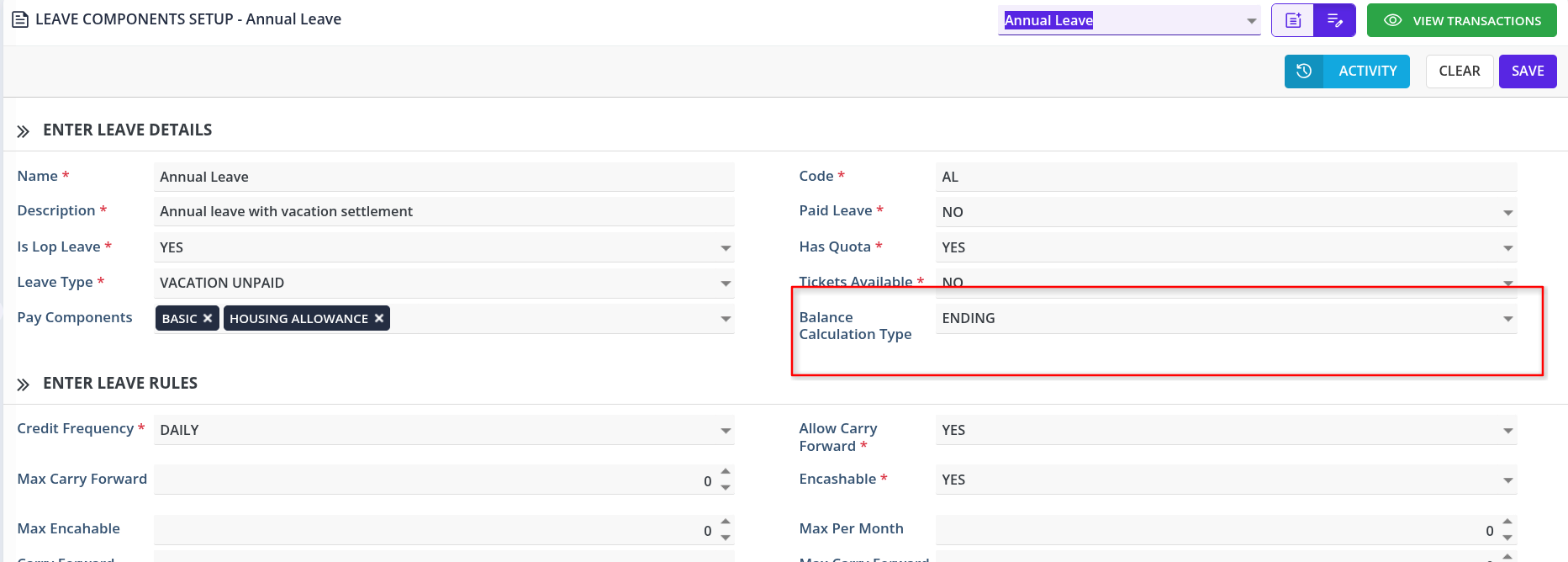
Example
An employee applies on Oct 1 for leave from Dec 1–31.
- Balance as of today (Oct 1): 22.5 days
- Balance as of Leave To Date (Dec 31), with Ending configured: 30 days
- The employee can now be approved for the full 30 days, since the system accounts for accrual through the end of the leave period.
Who's Affected
- HR/Payroll teams configuring leave policies — will need to set Balance Calculation Type for each leave component.
- Employees applying for future-dated leave (especially vacation/annual leave) — will see more accurate balances and fewer approval delays.
- Approving managers — approvals will be based on projected accrual, reducing back-and-forth on borderline balance cases.
Benefit
- More accurate leave approvals based on real accrual, not a stale snapshot
- Fewer rejected or delayed requests for leave planned in advance
- Per-leave-type flexibility instead of one rigid rule for all leave types
- Better alignment with how leave is actually planned and taken