Leave Return Request — Automate Actual Return Date Updates for Employees on Advance Salary
Say hello to Leave Return Request — a new document type that lets employees formally record their return from vacation, and automatically updates their leave request with the actual return date once approved. This is especially useful for employees who took advance salary before going on vacation, as it enables the system to begin calculating daily salary based on the confirmed return date.
With this release, employees and HR no longer need to manually track or update return dates on leave requests — the process is now fully workflow-driven and auditable.
What's New:
- A new document type, "Leave Return Request," is now available under Employee Document Request.
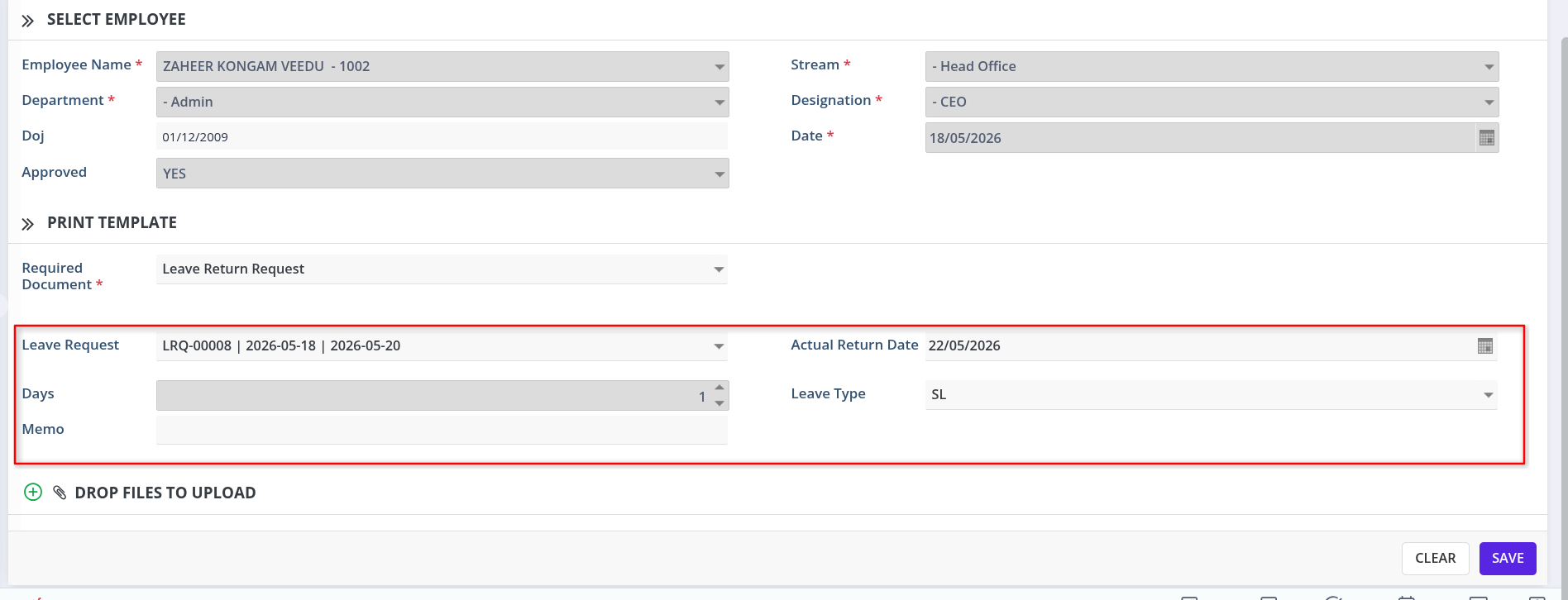
- When an employee selects this document type and chooses themselves as the employee, the system automatically loads all their approved leave requests where the actual return date is still empty.
- The employee can then:
- Select the relevant leave request from the dropdown.
- Enter the actual return date, Leave Type, and a memo.
- The Leave Type field is locked for regular users and defaults to NA — it can only be set or updated by a user with the DocApprover role during the approval process.
- The system automatically calculates the total number of days based on the leave "To Date" and the entered actual return date.
- Once the request completes all required approvals and is marked approved:
- The corresponding
Actual Return Dateis automatically updated in Leave Request. - A new leave request is created against the selected leave type for the return period.
- The corresponding
- A dedicated "Leave Return Details" section has been added to the Employee Document Request form to house these fields.
Why It Matters:
This release closes a manual gap in the leave-and-advance-salary process — ensuring return dates are captured consistently, approvals are enforced through a formal workflow, and daily salary calculations can begin accurately and on time.
To avail this feature, please contact our support team.