## 🚀 Introducing Smart Copy Quotation with Draft Mode
Copy. Review. Perfect. Then Submit.
Revising quotations just became smarter, safer, and faster.
With the new Smart Copy Quotation feature, you can create quotation revisions with complete confidence—no missing data, no dependency issues, and no accidental workflow triggers. Every copy is now created as a Draft, giving you full control before anything goes live.
✨ Why This Matters
Quotation revisions are critical—and even small errors can lead to big problems. This enhancement transforms quotation copying from a risky step into a reliable, controlled workflow designed for accuracy and peace of mind.
🌟 What’s New?
🛡️ Built-In Safety with User Confirmation
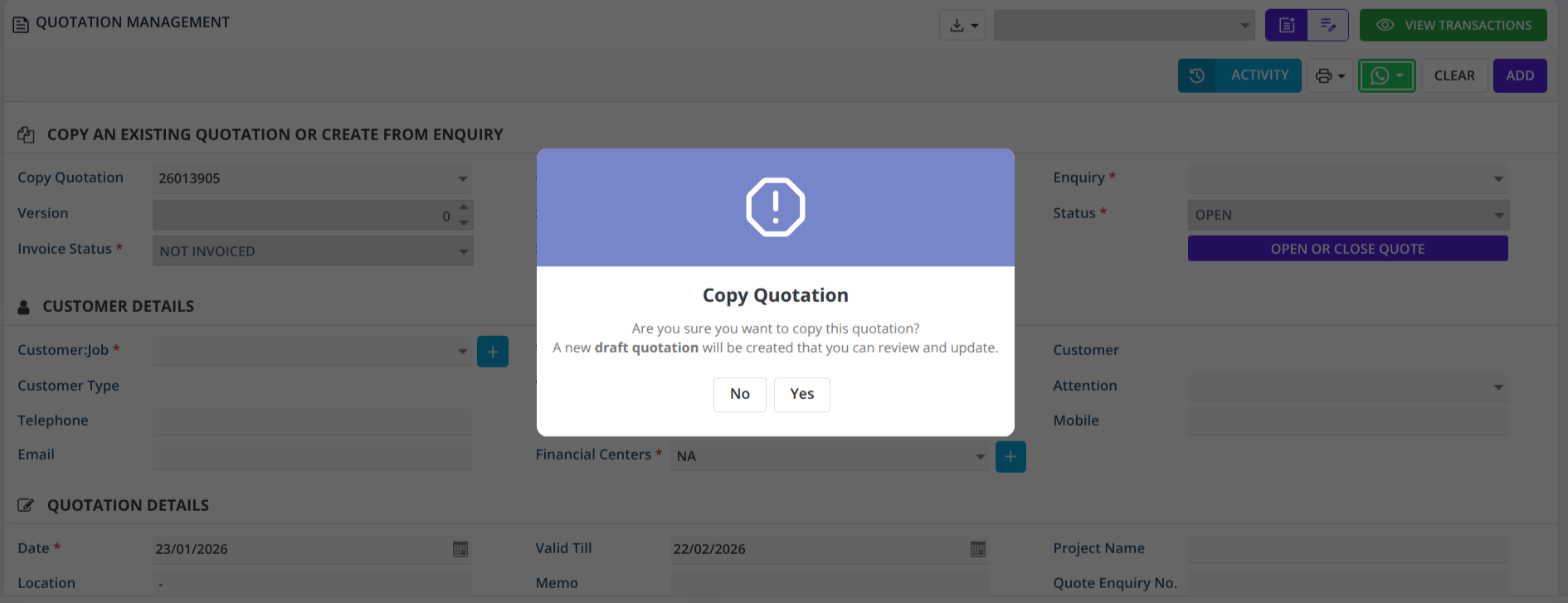
Before a quotation copy is created, the system prompts the user to confirm the action, ensuring full control and preventing accidental duplication.
-
Yes → A complete quotation is copied and created in Draft status
-
No → The action is cancelled instantly, and no data is saved
This confirmation step ensures that quotation copies are created only when the user explicitly intends to proceed.
✏️ Draft Mode: Review Before You Commit
Every copied quotation is created in Draft status, giving you full control before final submission.
-
Review and validate all quotation details
-
Keep the quotation as Draft for later updates
-
Submit only when you are ready
🛑 Submission Confirmation for Safety
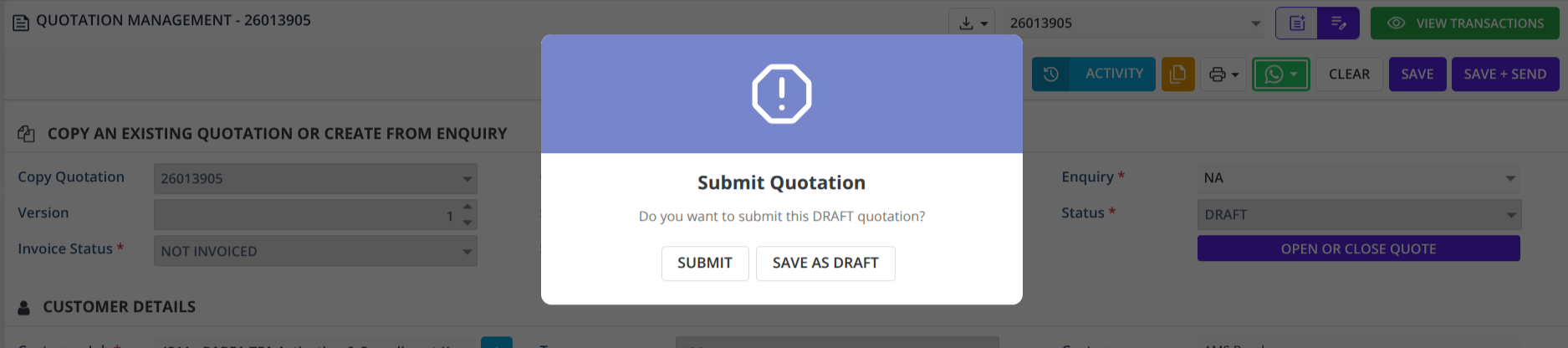
When you click Save on a Draft quotation, a confirmation popup appears:
-
Submit → Quotation is submitted, status changes to Active.
-
Save as Draft → Quotation remains in Draft status .
🚫 Draft Quotations Stay Hidden from Copy List
To avoid confusion and accidental reuse, Draft quotations will not appear in the “Copy Quotation” dropdown.
Only submitted (Active) quotations are available for copying.
📋 100% Complete & Accurate Data Copy
We’ve re-engineered the copy process to ensure total data integrity:
-
All quotation-related tables are copied
-
A new document number is generated automatically
-
All references are updated with the new quotation ID
-
No missing fields, no partial loads, no dependency issues
Just a clean, perfect copy—every time.
⚡ Faster, Cleaner Performance
-
Loading indicator during the copy process
-
Optimized backend logic for smooth execution
-
No dynamic bundle conflicts
-
Automatic redirection to the new quotation for seamless editing
Speed and stability, built in.
🎬 How It Works
1️⃣ Select "Copy Quotation" option
           ↓
2️⃣ Confirmation popup appears
           ↓
3️⃣ Click "Yes" → Loading state shown
           ↓
4️⃣ System creates complete copy with:
   • New document number
   • Draft status
   • All related data copied
   • Updated references
         ↓
5️⃣ Form reloads with new quotation ID
         ↓
6️⃣ Review, edit, and verify changes
         ↓
7️⃣ Click "Save", Confirmation popup appears
         ↓
8️⃣ Save as Draft OR Submit to activate
         ↓
9️⃣ On Submit: Status → Active, Workflow triggered if applied
👥 Who Will Love This?
-
Sales Teams – Revise quotations without fear of errors
-
Managers – Review drafts before client submission
-
Customer Success – Prepare multiple quote versions safely
-
Operations: Eliminate data inconsistency issues
🎓 Best Practices
- Always review the confirmation message before clicking "Yes"
- Use Draft status to prepare quotations for internal review
- Cross-verify all fields before clicking Submit
- Click Submit only when ready to activate workflows
- Cancel anytime by clicking "No" - no data is saved
💡 The Bottom Line
Smart Copy Quotation with Draft Mode gives you the freedom to review, refine, and perfect every quotation—before it matters.
No more rushed saves.
No more missing data.
Just confident, controlled quotation revisions.
HAL ERP — Designed for precision. Built for confidence. 🚀