🚀 Feature Update: Half-Day Attendance Enhancement
We’re excited to share an important update to improve how half‑day attendance is tracked and reported. This change provides greater accuracy and clarity for both employees and managers.
✨ What Changed?
1️⃣ New Field in Shift Management
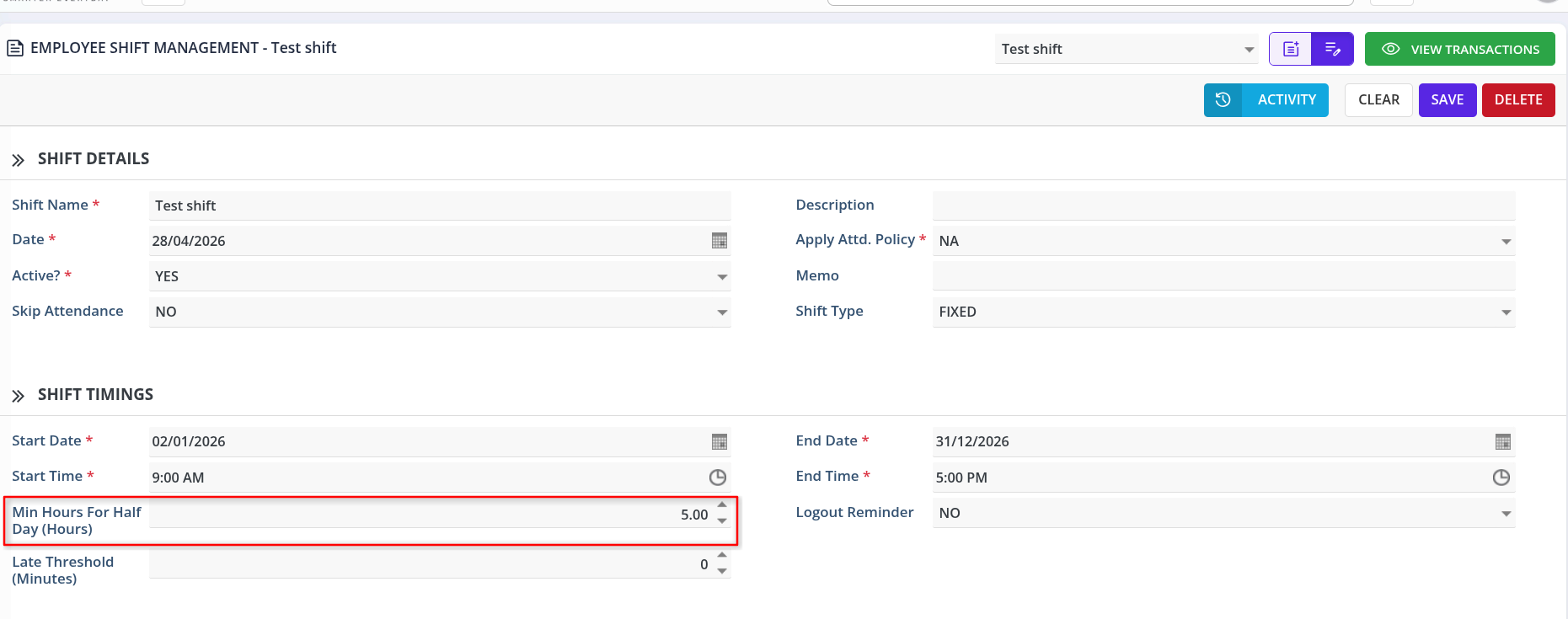
A configuration field has been added: “Min hours for half day (hours)”
-
Located under Shift Timings
-
Allows admins to define the minimum working hours required to count as a half day
2️⃣ Updated Attendance Logic
If an employee’s total worked hours are less than the configured “Min hours for half day” value, the system will automatically mark:
ontime_status = 'HALF DAY'
This applies even when the employee was present for part of the shift but didn’t meet the half‑day threshold.
3️⃣ Report Updates – Clearer “Ontime Status” Column
The following reports now display “HALF DAY” in the Ontime Status column when the condition is met:
-
Employee Daily Attendance Report
-
Daily Attendance Report
No more ambiguity – you’ll immediately see when an employee’s attended hours qualify as a half day.
🧪 Example
-
Min hours for half day → 5.00 hours
-
Regular shift hours → 9:00 AM – 5:00 PM
-
Employee works 4.5 hours →
ontime_status = 'HALF DAY' -
Employee works 5.0+ hours →
ontime_status = 'PRESENT'
📌 Why This Matters
-
✅ More accurate half‑day tracking
-
✅ Customizable per shift (different roles or locations can have different thresholds)
-
✅ Clearer reporting for payroll, attendance, and team leads
-
✅ Reduces manual adjustments for borderline attendance cases
🛠 Action Required (for Admins)
If you already use half‑day tracking, please review and update your shift templates:
-
Go to Shift Management
-
Edit each shift (like
Test shiftshown above) -
Set the “Min hours for half day (hours)” value (e.g., 5.0, 4.0, etc.)
-
Save changes
💡 If this field is left empty or zero, half‑day logic will not be applied.
📢 Questions or Feedback?
Reach out to the support team. We’re happy to help you configure the setting for your team’s needs.